cFos Personal Net
Host your files and synchronize your data
cFos Personal Net is a free web server and personal cloud for Windows 11/10/8.1/8/7. Current version: 5.02 of July 20, 2020; get it on the download page, the free license key is further down this page.
cFos Personal Net - cFos Software GmbH
- Instant web hosting on your PC
- Synchronize files, calendars and contacts of your smartphones and tablets - and with MS Outlook: OutlookDAV (beta)
- Easy server setup within a few minutes
- Cloud
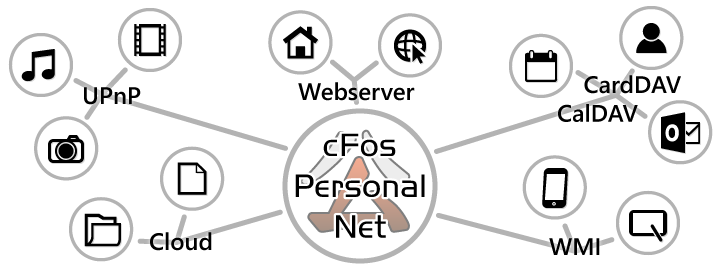
- cFos PNet allows easy sharing, downloading and uploading of files without further configuration. Simply copy the files into the public folder and everyone can download them using a normal web browser.
- UPnP
- cFos Personal Net has a built-in UPnP media server. You can activate it by setting the key enable_media_server=1 in the [param] section of GLOBAL.INI in the programdata\cfos\cfospnet directory.
- Webserver
- cFos Personal Net (PNet) is a full-featured HTTP server intended for personal and professional use. For personal use, instead of hosting websites with a webhoster, you just run it on your Windows machine. For professional use, you rent a virtual Windows PC or dedicated PC from a webhoster and run it there.
- CardDAV, CalDAV
- cFos Personal Net supports CalDAV (RFC 4791). This allows you to store and synchronize your calendar data.
cFos Personal Net supports CardDAV (RFC 6352). This allows you to store and synchronize your address book contacts with cFos Personal Net. - WMI
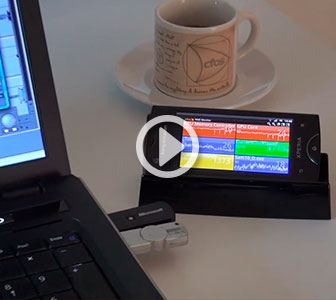
- The cFos WMI Monitor is a free add-on for cFos Personal Net to display nearly all WMI values about your system, e.g. CPU load, GPU load, network usage, ping time, etc. Access these WMI values from anywhere.
Install the free cFos Personal Net Key
To import the license key file, you need an already installed version of cFos Personal Net.
To license cFos Personal Net, you must double-click the downloaded license key file. A window will then appear with the text "cfos Personal Net Registration". You will later be asked for a password for your license key file. This password is:
LY6O-MB9M-3QWY-8QTN
After completing the dialog, your installation of cFos Personal Net is registered.
- Portable Mode - Allows you to host files without installing software or using 3rd party services
- Build your own personal cloud
- Seamless JavaScript integration
- Extremely short response time
- WebDAV, CalDAV and CardDAV support
- UPnP Media Server
- Sidebar Gadget for Windows Vista/7
cFos Personal Net Portable
Allows you to host files without installing software or using 3rd party services
Host a file in just 2 steps
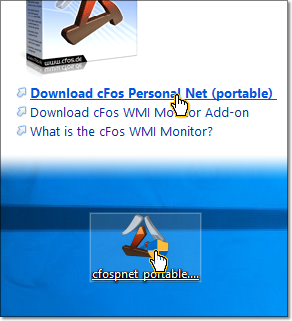
1 Download cFos Personal Net Portable (cfospnet_portable.exe) and start it.
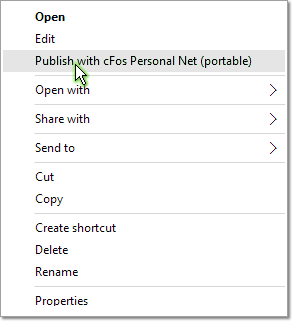
2 In Windows Explorer right-click on the file you want to make available for download and select "Publish with cFos Personal Net (portable)".

Set up NAT port forwarding
Here is our guide for popular routers.
Is your router already listed?
Additional info for cFos Personal Net Portable
Your download link is copied to the clipboard so you can paste it into an email or message.
You may need to allow NAT port forwarding in your router. You can also allow people to upload files. Right-click on the cFos Personal Net taskbar icon, select "publish" then "Upload link to clipboard"
Users of cFos Personal Net will find cfospnet_portable.exe in the installation directory, so you can use it in full server mode or portable mode. Most of the functionality of cFos Personal Net is also available in portable mode.
How to activate your license key: cFos Personal Net Portable creates a pub\admin directory in the location it was started from. Simply move your license key to this pub\admin directory. If your license key requires a password authorization, please contact us for a new key without password requirement.

cFos Personal Net Web Server
Installation and simple publishing
cFos WMI Monitor, a cFos Personal Net add-on package
The cFos WMI Monitor is a free add-on for cFos Personal Net to display nearly all WMI values about your system, e.g. CPU load, GPU load, network usage, ping time, etc. Access these WMI values from anywhere.
The cFos WMI Monitor helps gamers, power users, musicians, etc. to monitor the performance of different components in the system while running their (full-screen) applications. The cFos WMI Monitor makes this information available in a browser window on your PC or smartphone.